How to Use a Tinder Account Finder: 4 Methods to Find a Tinder Profile in 2026

Content Marketer
Learn four ways to find someone's Tinder profile in 2026, from manual swiping to a profile search tool, and what each one can and can't do.
You just caught your partner glancing at their phone again.
There’s that quick smile, the sudden “I’m just checking something,” or their screen flipping over as soon as you enter the room.
Your mind runs hot: late-night secrets, sudden reclusiveness, weird password changes. You try confronting it, but you’re met with “You’re overthinking it” or “Trust me, it’s nothing.”
That knot in your stomach is real. Whether you’re trying to find Tinder profiles to reconnect, or to catch a cheater, the uncertainty wears you down. Tinder’s design doesn’t let you freely search profiles, it’s built to surface matches algorithmically, not let you lookup individuals.
But with some patience, smart techniques, and modern tools, it is possible to uncover a profile.
Below are 4 methods to use a Tinder account finder approach to find dating profiles for reconnecting, verifying suspicions, or getting closure.
Why You Can’t Just “Search Tinder”

Before we dig in, here’s the cold, technical reality: Tinder intentionally disables open profile lookup. There’s no “search by name” feature.
Profiles aren’t indexed publicly in the same way other social media are. Your only route is through discovery (swipe loops) or indirect traces (linked social accounts, photos, data leaks).
Tinder’s privacy policy (in force since 4 April 2026) underscores that user data (photos, profile info, metadata) is stored, but not freely exposed to external search engines.policies.tinder.com
Also, Mozilla’s “privacy not included” reviews continue to flag Tinder and similar dating apps for weak transparency around how profile and location data is shared or inferred.
So, every method below works around the boundary Tinder sets up, either through its discovery engine, through clues found elsewhere, or with profile search tools that look for the profile from outside the app.
If you don't want to create a Tinder profile at all, see how to search Tinder without an account, which focuses only on the methods that skip the sign up.
Method 1: Strategic Discovery Tweaks (Low-Tech, Local)
This is the “manual but direct” approach: manipulate Tinder’s discovery algorithm to surface the person you’re looking for.
How it works:
- Create your own account - Tinder verifies your phone number with a code sent by SMS. Use your real photos: dummy or borrowed accounts break Tinder's rules and can get banned.
- Set location filters - narrow the distance to the person's city or neighbourhood. A VPN won't move you there: Tinder takes your location from your device, and a VPN only changes your IP address.
- Set age / gender ranges -match what you expect for the person you’re trying to find.
- Swipe persistently -keep swiping through “maybe / open” candidates in that zone.
- If you see them, don't swipe right immediately (if they like you back, you'll match). Note their distinctive bio and photos: Tinder blocks profile screenshots in some regions.
Pros & cons:
- Pros: Free (besides time), direct, stays within Tinder’s UI.
- Cons: Tedious, low yield, heavily dependent on being nearby, may never surface if they're out of your swipe zone, have turned off Discovery, or have blocked your number with Block Contacts.
This method is especially useful if you're trying to find Tinder profiles in your city or region and you have some idea of roughly where your target lives or works.
Method 2: Reverse Image & Cross-Platform Matching
One of the more reliable paths is usingimage-based clues.
Steps:
- Obtain a clear photo:from Instagram, Facebook, TikTok, LinkedIn, etc.
- Usereverse image search tools:
- TinEye
- Social Catfish
Look through results for other accounts using the same photo. Tinder profiles aren't indexed by search engines, so you won't find the profile itself, but you may confirm their first name, age, and city.
Use pieces you uncover (first name, age, city) to refine further searches.
This method works well with other techniques. For example, you might confirm someone's first name and city through reverse image search, then use them in a profile search tool.
Method 3: People-Search & Background Tools (Paid, Mostly US)

This is more of a digital detective path. Sites like Spokeo, BeenVerified, or Social Catfish search mostly US public records from a name, phone number, or email. Tinder never exposes a member's phone number or email, so these tools can't link a number to a Tinder account. What they can do is confirm who someone is and surface other social profiles.
Approach:
- Gather any identifiers you already have (full name, phone, email, username).
- Run a people-search lookup on one of these sites.
- Review the social profiles it lists, and keep what you can confirm (first name, age, city) for a profile search.
Caveats: these services often come with subscription or per-report fees, and their accuracy varies depending on region, data coverage, and whether the target has hidden or anonymized their profiles.
That said, when manual options fail, this method can help confirm identity details, mostly for people in the US.
Method 4: AI-Powered Tinder Account Finder Tools (Fast, Modern)

Many tools now present themselves as discreet "Tinder account finders" or Tinder profile search engines. They look for the profile from outside the app, using a name, age, location, and sometimes a photo.
Cheaterbuster is one of the best known names in this category, and our in-depth Cheaterbuster review breaks down how its search works and how reliable its results are.
How these tools typically work:
- You inputname, approximate age, location, and sometimesphoto.
- The tool looks for Tinder profiles that match those details.
- It returns areport: profile photos, bio, last activity, possible matching data, or whether no account was found.
Some of the tools currently in circulation:
- Cheateye.ai: our own tool. It searches Tinder for a specific person from their first name, age, gender, and city, with an optional photo, and covers Bumble, Hinge, Happn, and OkCupid with an add-on. A search costs 17.90 and the add-on 12.90 (USD, EUR, or GBP depending on your country). It doesn't search by phone number or email.
- Cheaterbuster AI: uses your inputs to search for Tinder profile presence.
Benefits:
- Speed: Results usually within a few minutes.
- Simplicity: You don’t need a Tinder account or manual swiping.
- Privacy: These tools often claim the searches are anonymous (i.e., the person you're searching doesn’t get notified).
Limitations & risks:
- Accuracy varies: If the input data (name, age, location) is off, results may false-match or miss. Even reviews of Cheaterbuster admit some searches miss or misidentify profiles.
- Hidden or deleted accounts: these tools look for active profiles. A deleted profile, or one hidden with Discovery turned off or a private mode, won't show up.
- Privacy, legal and ethical concerns: Using such tools to expose private identity information may violate local data protection or privacy laws depending on your country or state. Always check legality in your jurisdiction before scanning someone’s data.
- Cost: Many of these tools charge per search or via subscription.
If you choose to go this route, Cheateye.ai is the tool we built for it.
It isn't magic: results are better when your input is precise.
Manual vs. AI: Which Route to Take?
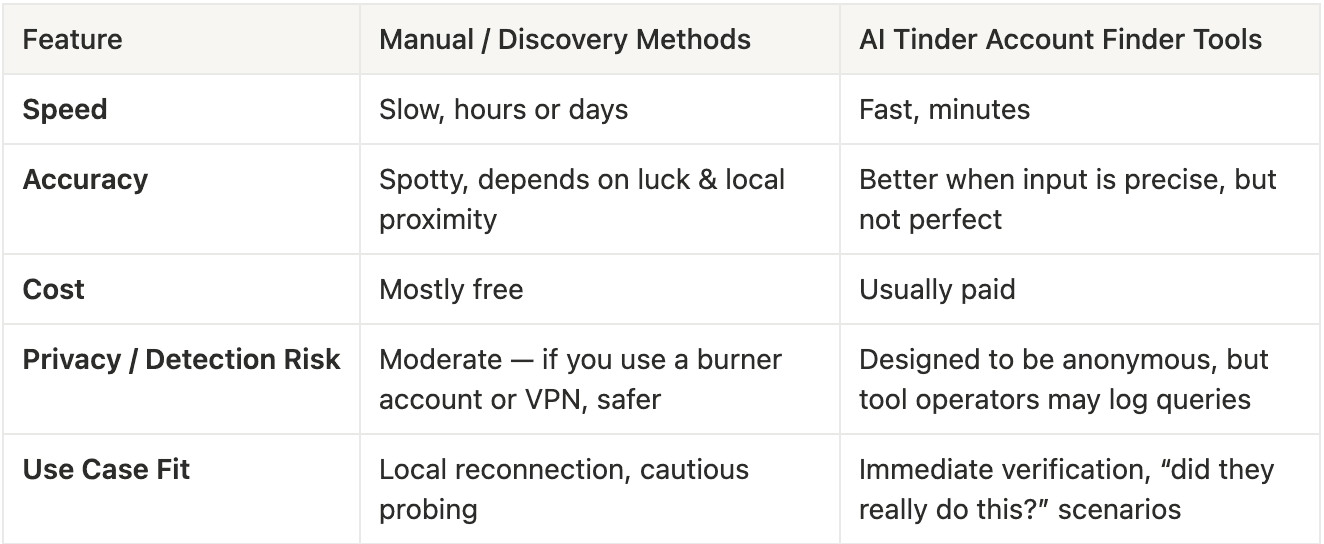
Manual methods are mostly free but slow, and depend on luck and proximity. A profile search tool is paid, but usually answers within a few minutes. A mixed approach works best: gather basic clues manually like first name, location, or a photo, and then use a search tool to confirm what you've found.
Step-by-Step Mini Case Study: How You’d Use It Today

Scenario: You suspect your partner is hiding a Tinder account. You have their first name, age (approx), city, and one clear Instagram photo.
- Start with reverse image search on the Instagram photo, to see which other accounts use it and confirm their first name and city.
- If you have your own Tinder account, narrow the distance and age range and swipe for a while, trying to spot a familiar bio or photo.
- Meanwhile, if they live in the US, a people-search service with their name and city can confirm their other social profiles.
- Finally, use aTinder account finder AI tool, inputting the name, age, city, and optionally the Instagram photo to see if a matching Tinder profile emerges.
- Cross-check results: if the AI tool gives a profile, compare photo, bio, location clues with what you know. If things align, you’ve got your answer.
Tips to Improve Success Rate
- Use moredistinctive identifiers(middle name, city, employer) when using any search tool.
- Usemultiple photosto enhance matching confidence.
- Work insmall location windowsto reduce noise.
- Save all evidence (screenshots, report logs) with timestamps.
What to Keep in Mind in 2026
- Many advanced tools claim“anonymous AI scans”that won’t alert the person you searched.
Always assume that Tinder and related platforms are constantly improving their privacy walls, what works today may break tomorrow.